Building a whole-home smart security system into a new construction is the single most cost-effective time to do it right. When walls are open and wiring is accessible, you can integrate smart locks, cameras, alarm systems, environmental sensors, and centralized control without the retrofitting costs that come later. Homeowners who plan security during the build phase avoid expensive rework and end up with a cleaner, more capable system.
Skipping this planning window means cutting into finished walls, running exposed conduit, and paying premium labor rates to install what could have been built in from the start.
This guide covers every component of a whole-home smart security plan, explains when each element should be installed, and shows how all the pieces connect into one reliable system.
What a Whole-Home Smart Security Plan Covers
A whole-home smart security plan is a coordinated system of devices, wiring, and monitoring services designed to protect every access point, interior zone, and environmental risk in a residential property. Unlike a single alarm or a standalone camera, a whole-home plan treats security as infrastructure — built in, connected, and managed from one place.
Understanding what a whole-home plan covers starts with knowing how individual components work together — our home security systems guide breaks down every layer of residential protection, from entry-point hardware to monitoring infrastructure, so you can build a complete picture before your first installation decision.
The core components of a new build security plan include access control at all entry points, video surveillance covering exterior perimeters and key interior zones, motion-activated lighting, a central alarm system with professional monitoring, and environmental sensors for smoke, carbon monoxide, and water intrusion. Each component serves a distinct function, and each one is easier and less expensive to install during construction than after.
Core Components of a New Build Security System
The foundation of any whole-home plan is a clear inventory of what needs protecting. For a new build, that means mapping every exterior door, window, garage entry, and outbuilding access point before framing is complete. This mapping exercise determines how many smart locks, sensors, and cameras the system requires — and where conduit and low-voltage wiring need to run.
A complete new build security system typically includes smart locks on all exterior doors, a video doorbell at the primary entry, exterior cameras covering all four elevations, interior motion sensors in high-traffic zones, a central alarm panel, smoke and CO detectors on every floor, and a smart home hub that ties all devices together.
How Smart Technology Integrates From Day One
Smart security devices communicate through Wi-Fi, Z-Wave, Zigbee, or a combination of all three. In a new build, the advantage is that your network infrastructure — router placement, access point locations, and ethernet runs — can be designed around your security system’s communication requirements rather than retrofitted to accommodate them. This means fewer dead zones, more reliable device connections, and a system that performs consistently across the entire property.
Smart Locks and Access Control for New Builds
Smart locks replace traditional deadbolts with keypad, fingerprint, or app-controlled entry systems that log access events, allow remote locking and unlocking, and integrate with your broader security platform. In a new build, every exterior door should be evaluated for smart lock compatibility before door frames and hardware are finalized.
The most important access control decisions in a new build involve door prep — specifically, whether doors are pre-drilled for standard deadbolt hardware or require custom boring for specific smart lock models. Making these decisions during framing prevents costly door replacements later.
Selecting and installing smart locks in a new build is a precision task that goes beyond hardware — our locksmith services explains how licensed professionals handle access control installation, rekeying, and smart lock integration to ensure every entry point is secured correctly from day one.
Choosing the Right Entry Points to Secure
Every exterior door, including side entries, garage access doors, and basement entries, should be on your access control list. Sliding glass doors and French doors require different hardware than standard hinged doors, and both need reinforced frames and multi-point locking mechanisms to meet the same security standard as a solid-core front door with a smart deadbolt.
Windows on the ground floor and any window accessible from a deck, porch roof, or attached structure should also receive contact sensors that trigger your alarm system when opened unexpectedly.
Smart Cameras and Video Monitoring Setup
A new build gives you the opportunity to run dedicated low-voltage wiring for every camera location before drywall goes up. This eliminates the need for wireless cameras that depend entirely on Wi-Fi signal strength and battery life — both of which degrade over time. Hardwired cameras deliver consistent power, stable connections, and higher video quality than their wireless counterparts.
Exterior camera placement should cover the front entry, driveway, all four building corners, and any detached structures such as garages or workshops. Interior cameras, where used, are typically placed in main living areas, garages, and home offices — never in bedrooms or bathrooms.
Powering a whole-home camera network requires dedicated wiring runs and outlet placement planned during the build phase — our electrical installation services covers how licensed electricians support low-voltage wiring, outlet placement, and panel capacity planning for security systems in new construction.
Indoor vs. Outdoor Camera Placement Strategy
Outdoor cameras should be mounted at 8 to 10 feet above ground level — high enough to avoid tampering but low enough to capture facial detail. Each camera should overlap slightly with adjacent cameras to eliminate blind spots. Bullet cameras work well for long driveways and perimeter coverage; dome cameras are better suited for corners and covered entry points where a wider field of view is needed.
Indoor cameras serve a different purpose: monitoring for motion during periods when the home is unoccupied. Placement at stairwells, main hallways, and garage entry points gives you coverage of the most likely interior movement paths without intruding on private living spaces.
Smart Lighting and Motion Detection Integration
Smart lighting is one of the most underutilized security tools in residential construction. Motion-activated exterior lights deter approach by eliminating the cover of darkness, and smart interior lighting can simulate occupancy when the home is empty — a proven deterrent against opportunistic break-ins.
In a new build, smart lighting integration starts with specifying smart switches or smart bulb fixtures during the electrical rough-in phase. Exterior floodlights with integrated motion sensors should be positioned to cover all entry points, driveway approaches, and side yard access paths. These lights can be programmed to trigger camera recording, send mobile alerts, and activate in response to alarm system events — creating a layered response to any detected intrusion.
Motion sensors inside the home serve double duty: they trigger lighting automation for convenience and feed motion data to your alarm system for security monitoring. Placing sensors in hallways, stairwells, and main living areas gives your system comprehensive interior coverage without requiring a camera in every room.
Alarm Systems and Professional Monitoring Options
A central alarm panel is the command center of your whole-home security system. It receives signals from every sensor, lock, camera, and detector in the network and triggers alerts, sirens, and notifications based on rules you define. In a new build, the alarm panel should be located in a secure interior space — a utility room, closet, or dedicated security cabinet — with a dedicated power circuit and battery backup.
Professional monitoring adds a human response layer to your alarm system. When a sensor triggers and you do not respond to the alert within a defined window, a monitoring center contacts you, then dispatches emergency services if needed. For new build homeowners, professional monitoring is particularly valuable during the first months of occupancy when routines are still being established and false alarm sensitivity is being calibrated.
Alarm systems in new builds often connect to broader household safety infrastructure — our safety and mobility services outlines how professional installation teams integrate alarm systems, emergency sensors, and accessibility features into a unified safety plan for residential properties.
Wired vs. Wireless Alarm Systems in New Construction
New builds present a clear case for wired alarm systems wherever possible. Wired sensors do not require battery replacement, are immune to radio frequency interference, and cannot be defeated by signal jamming — a growing concern with wireless-only systems. The cost difference between wired and wireless installation is minimal when walls are open, but significant when retrofitting a finished home.
A hybrid approach works well for most new builds: wired sensors on all doors and windows, wired smoke and CO detectors on every floor, and wireless devices only where running wire is genuinely impractical — such as detached structures or outbuildings.
Smoke, Carbon Monoxide, and Environmental Sensors
Environmental sensors protect against threats that no camera or lock can address. Smoke detectors, carbon monoxide detectors, and water leak sensors are the three categories every new build security plan must include — and all three benefit from smart integration that sends mobile alerts and triggers alarm system responses rather than relying solely on audible alarms.
The National Fire Protection Association requires smoke alarms in every bedroom, outside each sleeping area, and on every level of the home including the basement. Smart smoke detectors meet this requirement while adding remote alerts, self-testing capabilities, and integration with your central alarm panel.
Carbon monoxide detectors should be installed on every floor and within 15 feet of each sleeping area. In homes with attached garages, gas appliances, or fireplaces, CO detection is a life-safety requirement — not an optional upgrade.
Water leak sensors placed under sinks, near water heaters, at washing machine connections, and in basement areas provide early warning of leaks that can cause significant structural damage if undetected. In a new build, these sensors are inexpensive to install and can prevent claims that would otherwise affect your homeowner’s insurance history.
How to Plan Your Security System During the Build Phase
The most important principle in new build security planning is this: decisions made on paper are free; decisions made after drywall is up are expensive. Every conduit run, every low-voltage wire, every junction box location, and every device mounting point should be specified in your security plan before framing begins.
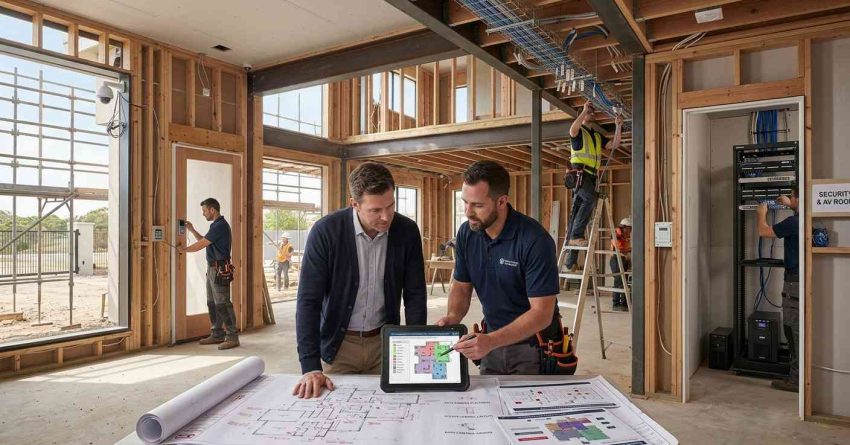
The planning sequence follows the construction schedule. During site preparation and foundation work, finalize your security system design and select your installer. During framing, run all conduit and low-voltage wiring. During rough electrical, install junction boxes, panel connections, and camera mounting brackets. During drywall and finishing, confirm all wire terminations are accessible. After certificate of occupancy, complete device installation, system programming, and monitoring activation.
Coordinating security hardware installation alongside active construction requires skilled tradespeople who can work within builder timelines — our handyman installation support explains how experienced technicians handle mounting, wiring prep, and device setup during the build phase without disrupting your project schedule.
Working With Your Builder and Security Installer
The most common planning failure in new build security is the gap between what the builder installs and what the security installer needs. Builders are responsible for structural and mechanical systems; security installers are responsible for device placement and system programming. Neither party is automatically responsible for coordinating with the other — that coordination falls to you as the homeowner.
Schedule a joint walkthrough with your builder and security installer before framing begins. Use this meeting to confirm conduit routes, identify conflicts with HVAC, plumbing, and electrical runs, and agree on who is responsible for each installation phase. Document every decision in writing and include it in your build contract.
Aligning your security plan with your builder’s construction schedule is the same coordination challenge faced in any major renovation — our remodeling and build coordination explains how project managers and skilled tradespeople work within active build timelines to deliver clean, code-compliant installations.
Smart Home Hubs and Centralized Control
A smart home hub is the software and hardware layer that connects every security device — locks, cameras, sensors, lights, and alarms — into a single interface controlled from one app. Without a hub, each device operates independently through its own app, creating a fragmented system that is difficult to manage and impossible to automate effectively.
The three dominant smart home platforms for residential security integration are Amazon Alexa, Google Home, and Apple HomeKit. Each platform has different device compatibility requirements, automation capabilities, and privacy policies. Choosing your platform before purchasing any devices ensures that every component you select is compatible and can be managed from one place.
Centralizing your security system through a smart home hub is the final step in creating a fully connected new build — our smart home installation covers hub selection, app integration, and professional setup services that bring every device under one control platform.
For new build homeowners, the hub setup phase happens after certificate of occupancy, when all devices are installed and powered. Professional setup services configure automation rules, set alert thresholds, test every sensor and camera, and walk you through the app interface before you move in — ensuring your system is fully operational from your first night in the home.
Conclusion
A whole-home smart security plan built into new construction delivers stronger protection, cleaner installation, and lower long-term costs than any retrofit approach. Every component — from smart locks and cameras to environmental sensors and a central hub — performs better when planned from the ground up.
The build phase is a one-time window to get the infrastructure right. Wiring, conduit, and device placement decisions made during construction define the capability of your security system for the life of the home.
At Mr. Local Services, our professionals coordinate security installation across every phase of your new build — from pre-frame wiring to final system activation. Contact us today to build a security plan that protects your home from day one.
Frequently Asked Questions
When should I start planning my smart security system for a new build?
Start planning before framing begins. Conduit runs, low-voltage wiring, and device mounting locations must be specified before walls close. Waiting until after drywall significantly increases installation costs and limits your options.
Can I add smart security to a new build after construction is complete?
Yes, but it costs more and delivers less. Wireless devices can be added post-construction, but hardwired cameras, sensors, and alarm panels require cutting into finished walls. Planning during the build phase is always the more cost-effective approach.
What is the difference between a wired and wireless security system for new construction?
Wired systems use physical cable runs to connect sensors and cameras to a central panel, offering greater reliability and no battery maintenance. Wireless systems use radio frequency signals and are easier to install in finished homes. New builds benefit most from a hybrid approach — wired where walls are open, wireless only where running wire is impractical.
How many cameras does a new build home typically need?
Most single-family new builds require between 6 and 12 cameras for complete exterior coverage — typically one per building corner, one at the front entry, one covering the driveway, and one at each secondary entry point. Interior camera needs vary based on homeowner preference and property layout.
Do smart security systems work without professional monitoring?
Yes. Most smart security systems function as self-monitored systems, sending alerts directly to your phone when sensors trigger. Professional monitoring adds a response layer — a monitoring center that contacts you and dispatches emergency services when you do not respond to an alert within a set timeframe.
What smart home platform works best for whole-home security?
The best platform depends on the devices you select and your existing ecosystem. Amazon Alexa offers the broadest device compatibility; Apple HomeKit offers the strongest privacy controls; Google Home integrates well with Android devices and Nest hardware. Choose your platform first, then select devices confirmed compatible with it.
How much does a whole-home smart security system cost for a new build?
Costs vary significantly based on system size, device quality, and monitoring plan. A basic system covering exterior cameras, smart locks, and a monitored alarm panel typically ranges from $2,000 to $5,000 installed in a new build. Comprehensive systems with full interior coverage, environmental sensors, and professional monitoring can range from $5,000 to $15,000 or more.