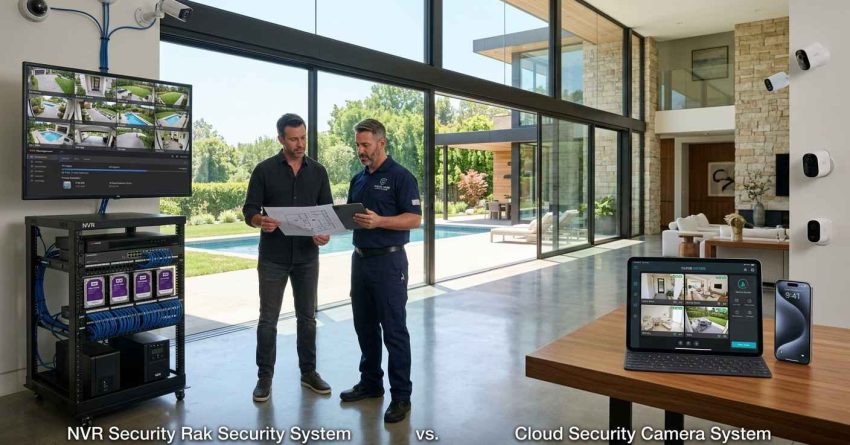
NVR and cloud security camera systems protect your property in fundamentally different ways — one stores footage locally on a dedicated recorder, the other sends it to remote servers you access from anywhere. Choosing between them affects your upfront costs, monthly fees, data privacy, and how reliably your cameras work when your internet goes down.
This comparison matters most when you are setting up security for the first time or upgrading an existing system. Getting the decision wrong means paying for features you do not need or missing the ones you do.
This guide breaks down how each system works, where they differ on cost and reliability, and which option fits your property type and security goals best.
What Is an NVR Security Camera System?
An NVR, or Network Video Recorder, is a local storage system that records footage from IP cameras directly onto a hard drive housed inside the recorder unit. The cameras connect to the NVR through a wired network, typically using Power over Ethernet (PoE) cables that carry both data and power through a single connection. Because recording happens on-site, the system does not depend on an internet connection to capture and store footage.
NVR systems are common in homes and rental properties where the owner wants full control over their footage without relying on a third-party service. The recorder sits on-site, the footage stays on-site, and access to recordings does not require a monthly subscription. Most modern NVR units support remote viewing through a mobile app, so you can check live feeds from anywhere as long as your home network is online.
The main trade-off is physical vulnerability. If the recorder is stolen, damaged, or destroyed in a fire or flood, the footage goes with it unless you have set up a secondary backup. NVR systems also require more planning during installation because of the cabling involved. NVR cameras are one component of a broader security strategy — our home security systems guide covers every option available to homeowners and property managers, from entry-level setups to full-property surveillance.
How NVR Systems Store and Process Footage
NVR cameras capture video at the camera level, encoding the footage before sending it over the network to the recorder. This differs from older DVR systems, which processed raw analog signals at the recorder itself. Because encoding happens at the camera, NVR systems support higher resolutions, better image quality, and more flexible camera placement.
Storage capacity depends on the size of the hard drive installed in the recorder and the recording settings you choose. A standard 2TB drive can hold between 7 and 30 days of footage depending on resolution, frame rate, and whether the system records continuously or only on motion detection. Most NVR units support hard drive upgrades, giving you room to expand storage as your needs grow. Understanding how footage is stored is only part of the picture — our NVR camera setup walks through the full installation process, equipment requirements, and what to expect from a professional configuration.
Common Use Cases for NVR Cameras at Home
NVR systems work well for homeowners and landlords who want a permanent, high-resolution setup with no recurring fees. They are a strong fit for properties with multiple entry points, large lots, or areas where consistent internet connectivity cannot be guaranteed. Rental property owners often prefer NVR systems because the footage stays under their control and does not require tenants to manage a subscription.
What Is a Cloud Security Camera System?
A cloud security camera system sends recorded footage over the internet to remote servers managed by the camera manufacturer or a third-party provider. Instead of storing video on a local hard drive, the footage is uploaded continuously or on motion triggers and stored in the cloud, where you can access it from any device with an internet connection.
Cloud cameras are typically wireless, making them easier to install and reposition without running cables through walls. Setup usually involves connecting the camera to your Wi-Fi network and creating an account with the provider’s app. Most cloud systems offer free storage for a limited number of days and charge a monthly or annual subscription for extended storage, multiple cameras, or advanced features like facial recognition and package detection.
Cloud cameras integrate naturally with other connected devices, and our smart home security explains how these systems work together to give homeowners centralized control over their entire property.
How Cloud Storage and Remote Access Work
When a cloud camera detects motion or records continuously, it compresses the video and uploads it to the provider’s servers using your home internet connection. You access that footage through a mobile app or web browser, with no need to be on the same network as the camera. Most providers offer end-to-end encryption for footage in transit and at rest, though the level of security varies by brand.
Remote access is one of the strongest advantages of cloud systems. You can check live feeds, review recorded clips, and receive real-time alerts from anywhere in the world. Some systems allow you to share access with family members, property managers, or security monitoring services without giving them physical access to a recorder.
Common Use Cases for Cloud Cameras at Home
Cloud cameras are well suited for renters, homeowners who move frequently, or anyone who wants a simple setup without professional installation. They are also a practical choice for monitoring a second property, vacation home, or rental unit remotely. The wireless design makes them easy to add to existing setups, and the app-based interface is accessible for users who are not comfortable with network configuration.
NVR vs Cloud Security Cameras: Key Differences
The core difference between NVR and cloud systems comes down to where footage is stored, how much control you have over it, and what happens when your internet connection fails. For a side-by-side breakdown of all major camera types beyond NVR and cloud, our security camera comparison guide covers resolution, field of view, night vision, and connectivity across every major format.
Storage Location and Data Ownership
With an NVR system, footage is stored on a hard drive you own and control. No third party has access to your recordings, and you are not dependent on a provider staying in business or maintaining their servers. With a cloud system, your footage is stored on servers owned by the camera manufacturer or their cloud partner. You access it through their platform, and if the company changes its pricing, discontinues a product, or experiences a data breach, your footage is affected.
For landlords and property managers handling footage that may be used as legal evidence, local storage with clear chain-of-custody documentation is often the more defensible option.
Internet Dependency and Reliability
NVR systems record locally regardless of whether your internet connection is working. If your router goes down or your ISP has an outage, the cameras keep recording to the hard drive. Cloud cameras stop uploading footage the moment internet connectivity is lost. Some cloud cameras include a small amount of local backup storage on an SD card, but this is typically limited to a few hours of footage and is not a reliable substitute for full local recording.
For properties in areas with unreliable internet service, or for any location where continuous recording is a priority, NVR systems offer a meaningful reliability advantage.
Cost Comparison: Upfront vs Ongoing Fees
NVR systems carry a higher upfront cost. A complete four-camera NVR setup with a recorder, PoE switch, and installation typically ranges from $400 to $1,200 depending on camera resolution and storage capacity. After that, there are no mandatory recurring fees, though you may pay for remote viewing apps or hard drive replacements over time.
Cloud camera systems have lower entry costs, with individual cameras ranging from $50 to $200, but most require a monthly subscription for full functionality. Subscription plans typically range from $3 to $10 per camera per month, or $10 to $30 per month for whole-home plans. Over three to five years, the total cost of a cloud system often exceeds that of a comparable NVR setup. Budgeting for a camera system involves more than the hardware price — our breakdown of security installation costs covers labor, equipment, subscription tiers, and long-term maintenance expenses in full detail.
Which System Is Better for Your Property?
Neither system is universally better. The right choice depends on your property type, technical comfort level, budget timeline, and how much control you want over your footage.
Best Choice for Homeowners
Homeowners who plan to stay in their property long-term and want a permanent, high-resolution system with no monthly fees will generally get more value from an NVR setup. The higher upfront investment pays off over time, and the local storage model gives you complete ownership of your footage. If you already have a structured wiring setup or are doing a renovation, adding NVR cabling during construction is significantly cheaper than retrofitting later.
Homeowners who rent, move frequently, or want a quick setup without professional installation will find cloud cameras more practical. The wireless design, simple app setup, and flexible subscription options make cloud systems accessible for people who are not ready to commit to a permanent installation.
Best Choice for Landlords and Property Managers
Landlords managing multiple properties benefit from cloud systems when remote monitoring and centralized access are the priority. A single app can show live feeds from every property, and cameras can be added or removed without rewiring. For properties where tenants handle day-to-day management, cloud cameras reduce the need for on-site technical support.
For high-value properties or locations where footage may be needed for insurance claims or legal proceedings, NVR systems provide more reliable, tamper-resistant local storage. Choosing the right system starts with understanding your property’s specific vulnerabilities, and our property security assessment resource helps homeowners and landlords identify the coverage gaps that matter most.
When to Use Both Systems Together
Some property owners use a hybrid approach, combining NVR cameras for primary coverage at fixed locations with cloud cameras for flexible monitoring at entry points, garages, or secondary buildings. This gives you the reliability and storage depth of a local system alongside the remote access and easy installation of cloud cameras. Hybrid setups are more common in larger properties or multi-unit buildings where no single system covers every need.
Installation and Maintenance Considerations
NVR systems require more planning and physical work to install. Cameras must be mounted, cables must be routed through walls or along exterior surfaces, and the recorder must be positioned in a secure, accessible location. For most homeowners, professional installation is the practical choice, particularly for multi-camera setups or properties with complex layouts.
Cloud cameras are designed for self-installation. Most mount with a single screw or adhesive bracket, connect to Wi-Fi through a smartphone app, and are operational within minutes. The trade-off is that wireless cameras are more susceptible to signal interference, and battery-powered models require periodic recharging or battery replacement.
Professional vs DIY Setup
Professional installation ensures cameras are positioned for optimal coverage, cables are concealed and protected, and the system is configured correctly from the start. It also provides a point of accountability if something goes wrong. For homeowners who prefer a professionally managed setup without a full security contractor, our handyman installation services team handles camera mounting, cable routing, and basic system configuration across residential and commercial properties.
DIY installation works well for cloud cameras in straightforward locations. If you are mounting cameras at standard entry points on a single-story home with good Wi-Fi coverage, self-installation is a reasonable option. For NVR systems, multi-story properties, or any setup involving cable routing through finished walls, professional installation reduces the risk of errors that affect long-term performance.
Privacy, Security, and Data Protection
Data privacy is a meaningful consideration when choosing between NVR and cloud systems. With a local NVR setup, your footage never leaves your property unless you choose to share it. You control who has access, how long recordings are kept, and when they are deleted. There is no risk of a provider’s server being breached or a company changing its data retention policies.
Cloud systems introduce a third party into your security infrastructure. Reputable providers use strong encryption and publish clear data policies, but you are trusting an external company with footage of your home, your tenants, and your property. Before choosing a cloud provider, review their data retention policy, encryption standards, and what happens to your footage if you cancel your subscription.
Both system types are subject to local laws governing surveillance on private property. Recording in common areas of rental properties, capturing footage of neighboring properties, or using audio recording features may be restricted depending on your state. Protecting your footage is part of a larger commitment to property safety — our home safety services outlines the full range of measures available to keep your home secure, accessible, and well-protected year-round.
Conclusion
NVR systems offer local storage, long-term cost efficiency, and complete data ownership, making them the stronger choice for permanent installations and high-value properties. Cloud systems deliver flexible, wireless convenience with remote access that suits renters, landlords managing multiple sites, and anyone prioritizing ease of setup over long-term savings.
The right system depends on your property type, budget horizon, and how much control you want over your footage. Both options provide reliable protection when matched correctly to the property they serve.
At Mr. Local Services, our team helps homeowners and property managers choose, install, and maintain the right security camera system for their specific needs — contact us today to get started with a setup that protects your property year-round.
Frequently Asked Questions
What is the main difference between NVR and cloud security cameras?
NVR cameras store footage locally on a hard drive at your property, while cloud cameras upload footage to remote servers over the internet. NVR systems work without internet, while cloud systems require a reliable connection to record and store video.
Do NVR security cameras require a monthly fee?
Most NVR systems do not require a monthly subscription. You pay for the hardware and installation upfront, and footage is stored on a local hard drive you own. Some NVR brands offer optional cloud backup services for an additional fee, but these are not required for the system to function.
Can cloud security cameras work without internet?
Cloud cameras cannot upload or store footage without an internet connection. Some models include a small SD card for limited local backup, but this is not a substitute for full cloud storage. If your internet goes down, most cloud cameras stop recording until connectivity is restored.
Which is more secure, NVR or cloud cameras?
NVR systems are generally considered more secure from a data privacy standpoint because footage never leaves your property. Cloud systems rely on third-party servers, which introduces the risk of data breaches or policy changes. However, cloud providers with strong encryption and clear data policies can still offer a high level of security.
How long do NVR systems store footage?
Storage duration depends on the hard drive size, the number of cameras, and the recording settings. A 2TB drive typically stores between 7 and 30 days of footage. You can extend storage by upgrading the hard drive, reducing resolution, or enabling motion-only recording to reduce file sizes.
Are cloud security cameras good for rental properties?
Cloud cameras work well for landlords who need remote access to multiple properties from a single app. They are easy to install and reposition between units. However, landlords who need footage for legal or insurance purposes may prefer NVR systems for their more reliable local storage and clearer chain of custody.
What happens to cloud camera footage if I cancel my subscription?
Most cloud providers delete stored footage when a subscription is cancelled or lapses. Before cancelling, download any recordings you need to keep. Review your provider’s data retention policy carefully, as some delete footage immediately while others offer a short grace period.