
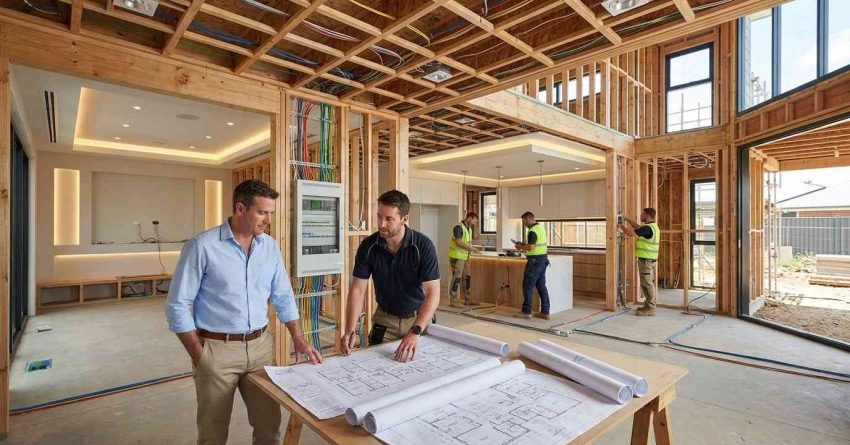
Planning smart lighting into a new build from the start gives you complete control over every circuit, switch, and scene in your home — and it costs far less than retrofitting later. A new build is the single best opportunity to design a lighting system that is fully integrated, energy-efficient, and built to grow with your technology needs. Getting the plan right before the walls close is the difference between a seamless smart home and a costly workaround.
Smart lighting decisions made during construction affect your electrical rough-in, your automation compatibility, and your long-term energy costs — missing this window means expensive changes later.
This guide covers every stage of smart lighting planning for new builds: system design, component selection, protocol choices, electrical requirements, and the most common mistakes to avoid.
What Smart Lighting Means for a New Build Home
Smart lighting is a system of connected light fixtures, switches, dimmers, and controls that can be managed remotely, automated by schedule or sensor, and integrated with other home systems. In a new build, smart lighting is not an add-on — it is a foundational design decision that shapes how your electrical system is wired, how your walls are framed, and how your home automation platform is configured.
The core difference between smart lighting in a new build versus a retrofit is access. During construction, your electrician can run the exact wiring your system requires, place switches and sensors in optimal locations, and size your electrical panel to support the full load. That access disappears once drywall goes up.
Smart lighting in a new build typically includes smart switches or dimmers, connected fixtures or smart bulbs, a central hub or cloud-based controller, occupancy and daylight sensors, and integration with voice assistants or a home automation platform. Each of these components needs to be accounted for in your electrical plan before a single wire is pulled. Smart lighting in a new build is one of the most rewarding electrical upgrades you can plan from the ground up — our electrical services guide covers every wiring, panel, and circuit consideration that supports a fully integrated lighting system.
Planning Your Smart Lighting System Before Construction Begins
The planning phase is where most new build smart lighting projects succeed or fail. Decisions made on paper before construction starts determine what is possible, what is practical, and what will cost you later. The earlier you bring your lighting plan into the construction process, the more options you have and the lower your costs.
Start by defining how you want to use lighting in each space. Think about which rooms need dimming capability, where you want automated scenes, which areas benefit from occupancy sensing, and where you need outdoor or landscape integration. This functional map becomes the foundation of your electrical plan.
Mapping Zones and Lighting Circuits
Lighting zones are groups of fixtures controlled together as a single unit. In a new build, you define zones before rough-in so your electrician can wire each zone to its own circuit or switch leg. Common zones include ambient lighting, task lighting, accent lighting, and landscape or exterior lighting.
Each zone needs its own circuit or switch point. Mixing zones on a single circuit limits your control options and creates problems when you want to automate or dim independently. Map every zone room by room, then confirm the circuit layout with your electrician before framing begins.
Choosing a Smart Lighting Protocol (Wi-Fi, Zigbee, Z-Wave)
Your lighting protocol determines how your devices communicate and which hub or platform they require. The three most common protocols for residential smart lighting are Wi-Fi, Zigbee, and Z-Wave.
Wi-Fi devices connect directly to your home network without a hub. They are easy to set up but can strain your router if you have many devices. Zigbee and Z-Wave use mesh networks where each device extends the signal, making them more reliable in larger homes. Both require a compatible hub. Zigbee is widely supported by platforms like Amazon Echo and SmartThings. Z-Wave operates on a separate radio frequency, which reduces interference from other wireless devices.
Choose your protocol before purchasing any devices, because mixing protocols without a compatible hub creates integration problems that are difficult to resolve after installation. If you need hands-on help installing smart switches or configuring devices after your electrician completes rough-in, our handyman installation help team can handle device mounting, pairing, and setup across every room.
Getting your lighting plan right before the walls close requires a broader look at your home’s electrical infrastructure — our smart home electrical planning resource walks through every system-level decision that affects how your lighting, automation, and circuits work together.
Essential Components of a New Build Smart Lighting Setup
A complete smart lighting system for a new build includes several core components. Understanding what each one does and where it fits in your plan helps you make purchasing decisions that work together rather than against each other.
Smart Switches and Dimmers
Smart switches replace standard wall switches and give you remote control, scheduling, and scene capability without changing your bulbs. In a new build, smart switches are often the preferred choice because they work with standard LED fixtures and do not require bulb replacement when you upgrade or redecorate.
Smart dimmers require compatible dimmable fixtures and bulbs. Confirm dimmer compatibility with your fixture manufacturer before purchasing, because not all LED bulbs dim smoothly on all dimmer models. Your electrician needs to know which switch type you are using before rough-in, because some smart switches require a neutral wire that older wiring configurations do not include — but new builds always can.
Smart Bulbs vs. Hardwired Smart Fixtures
Smart bulbs contain the intelligence inside the bulb itself, connecting directly to Wi-Fi or a Zigbee/Z-Wave mesh. They offer flexibility because you can change bulb color temperature or color without rewiring. The trade-off is that smart bulbs lose their smart functionality if someone turns off the wall switch, cutting power to the bulb.
Hardwired smart fixtures integrate the control electronics into the fixture itself and are controlled through a smart switch or dimmer at the wall. They are more reliable in high-use areas and eliminate the problem of bulbs losing connectivity. For new builds, hardwired fixtures in key areas combined with smart switches at the wall is the most reliable long-term approach.
Integrating Smart Lighting with Your Home Automation System
Smart lighting delivers its full value when it is connected to a home automation platform that coordinates lighting with other systems — security cameras, door locks, thermostats, motorized shades, and voice assistants. In a new build, this integration is planned at the same time as your lighting system, not after.
The most widely used home automation platforms in the US include Amazon Alexa, Google Home, Apple HomeKit, and SmartThings. Each platform has different device compatibility requirements. Before selecting your lighting components, confirm that every device you plan to purchase is certified for your chosen platform.
Scenes and automations are where smart lighting becomes genuinely useful. A morning scene can gradually increase light levels to simulate sunrise. An away mode can turn off all lights and activate security lighting when you leave. A movie scene can dim the living room and turn off the hallway. All of these require your lighting system and automation platform to be configured together from the start.
Smart lighting is most powerful when it is part of a complete home upgrade — if you are planning broader changes alongside your new build, our home remodeling services team can coordinate lighting integration with structural, finish, and system-level improvements.
Electrical Rough-In Requirements for Smart Lighting
Electrical rough-in is the stage of construction where wiring is run through walls and ceilings before drywall is installed. This is the most critical window for smart lighting planning, because changes after rough-in require opening walls.
Smart lighting rough-in requirements differ from standard lighting in several important ways. Smart switches typically require a neutral wire at every switch location. Standard three-way switch wiring may not include a neutral, so your electrician needs to run an additional wire if you plan to use smart three-way switches. Confirm this requirement with your switch manufacturer before rough-in begins.
Conduit is worth considering in walls where you may want to run additional wiring in the future. While not always required by code, conduit makes future upgrades significantly easier and less expensive. Your electrician can advise on where conduit makes the most sense based on your home’s layout.
Panel capacity is another rough-in consideration. Smart lighting systems, especially those with motorized shades, outdoor lighting, and landscape integration, add load to your electrical panel. Size your panel to accommodate your full planned system plus a reasonable margin for future additions. Every smart lighting rough-in must meet local code requirements and be completed by a qualified electrician — our licensed electrical services team handles new build wiring, panel sizing, and circuit planning to ensure your smart lighting system is built on a safe, code-compliant foundation.
Energy Efficiency and Cost Savings with Smart Lighting
Smart lighting reduces energy consumption through three primary mechanisms: LED efficiency, occupancy-based control, and daylight harvesting. In a new build, all three can be designed in from the start rather than added as afterthoughts.
LED fixtures use significantly less energy than incandescent or halogen alternatives. When combined with smart controls that automatically turn lights off in unoccupied rooms and dim fixtures when natural light is sufficient, the energy savings compound. Occupancy sensors in hallways, bathrooms, and utility rooms eliminate the energy waste of lights left on in empty spaces.
Daylight harvesting uses photosensors to measure natural light levels and automatically adjust artificial lighting to maintain a consistent brightness level. In rooms with large windows or skylights, daylight harvesting can reduce lighting energy use substantially during daylight hours.
Smart lighting also gives you visibility into your energy use through your home automation platform. Many platforms provide room-by-room energy monitoring that helps you identify where consumption is highest and where additional automation would have the most impact. Energy-efficient lighting also supports broader home safety goals — our home safety upgrades explains how lighting, sensors, and automation work together to create a safer, more accessible living environment.
Common Smart Lighting Mistakes in New Builds (and How to Avoid Them)
New build smart lighting projects fail in predictable ways. Knowing the most common mistakes before you start saves money, time, and frustration.
The most frequent mistake is choosing devices before choosing a platform. Purchasing smart bulbs, switches, and sensors from different ecosystems without confirming platform compatibility results in a system that cannot be controlled from a single app or voice assistant. Choose your platform first, then select certified devices.
The second most common mistake is failing to specify neutral wire requirements before rough-in. Smart switches almost universally require a neutral wire. If your electrician runs standard switch wiring without a neutral, you will either need to use a different switch model, purchase a neutral wire adapter, or open walls to re-run wire. All three options cost more than specifying correctly at the start.
A third mistake is under-planning zones. Homeowners often plan lighting zones room by room without thinking about how zones will be used together. A living room with a single zone cannot independently control ambient, task, and accent lighting. Plan zones by function, not just by room.
Finally, many new build owners skip the hub entirely and rely on Wi-Fi-only devices. Wi-Fi devices are convenient but create network congestion in larger homes and lose functionality during internet outages. A dedicated hub running Zigbee or Z-Wave provides a more reliable local network that continues to function even when your internet connection is down. Most smart lighting mistakes stem from decisions made before construction begins — our smart home planning guide helps you avoid the most costly errors by walking through every pre-construction decision in the right order.
Conclusion
A smart lighting master plan for a new build covers system design, protocol selection, component choices, electrical rough-in, and home automation integration — all decided before construction begins. The planning phase is where the most important decisions are made and where the most costly mistakes happen. Getting each stage right in sequence produces a lighting system that is reliable, energy-efficient, and built to expand as your needs change.
Smart lighting in a new build is not just a convenience upgrade — it is a long-term investment in your home’s functionality, energy performance, and resale value. The decisions you make during construction determine what your system can do for decades.
At Mr. Local Services, our licensed electricians and home service professionals help new build homeowners plan and install smart lighting systems that are code-compliant, fully integrated, and built right the first time — contact us today to get your smart lighting plan started.
Frequently Asked Questions
What is the best time to plan smart lighting in a new build?
The best time to plan smart lighting is during the design phase, before construction begins. Decisions about zones, protocols, and switch types must be communicated to your electrician before electrical rough-in so the correct wiring is run while walls are open.
Do I need a smart hub for new build smart lighting?
A smart hub is not always required, but it is strongly recommended for larger homes or complex systems. Hubs running Zigbee or Z-Wave provide a reliable local network that works even during internet outages, and they support more devices than Wi-Fi-only setups without straining your router.
Can smart lighting work without Wi-Fi?
Yes. Smart lighting systems using Zigbee or Z-Wave protocols communicate through a local mesh network and do not require an active internet connection for basic functions like switching and dimming. Internet connectivity is needed for remote access and cloud-based automations.
How much does smart lighting add to a new build cost?
Smart lighting costs vary based on system size, component quality, and integration complexity. Basic smart switch systems add a modest premium over standard wiring, while fully integrated systems with motorized shades, sensors, and a dedicated hub represent a larger investment. Planning during construction minimizes labor costs compared to retrofitting.
What electrical rough-in do electricians need for smart lighting?
Electricians need to know your switch type (smart switch or smart dimmer), whether neutral wires are required at every switch location, your zone layout, and your panel load requirements. Providing this information before rough-in begins prevents costly re-wiring later.
Is smart lighting compatible with all home automation systems?
No. Smart lighting devices are certified for specific platforms such as Amazon Alexa, Google Home, Apple HomeKit, or SmartThings. Compatibility varies by brand and protocol. Always confirm device certification for your chosen platform before purchasing any components.
Can I add more smart lighting zones after construction is complete?
Yes, but it is more expensive and disruptive than planning zones during construction. Adding a new zone after drywall requires opening walls to run new wiring. Planning additional zones during rough-in — even if you do not activate them immediately — is a cost-effective way to future-proof your system.