Lutron Caseta, RadioRA3, and HomeWorks are three distinct smart lighting control systems designed for different property sizes, budgets, and automation needs — and choosing the wrong one can mean paying for features you will never use or installing a system that cannot grow with your property. Each platform sits at a different tier of Lutron’s lineup, from straightforward plug-and-play switches to fully programmable whole-home automation.
Understanding the differences between these three systems helps homeowners, landlords, and property managers make a confident, cost-effective decision before any wiring begins.
This guide breaks down each system’s core features, ideal use cases, and key differences so you can identify the right fit for your property and take the next step with a qualified professional.
What Is Lutron Caseta?
Lutron Caseta is Lutron’s entry-level smart lighting system, designed for homeowners who want reliable wireless dimming and control without complex installation or professional programming. It uses Lutron’s Clear Connect RF technology to communicate between devices, which provides a stable, interference-resistant signal even in homes with crowded Wi-Fi environments.
Caseta works with a simple plug-in smart bridge that connects to your home router, enabling control through the Lutron app, voice assistants like Amazon Alexa and Google Home, and third-party platforms including Apple HomeKit and SmartThings. Setup is straightforward enough for a confident DIYer, though a licensed electrician ensures safe, code-compliant wiring.
Key Features of Lutron Caseta
- Wireless dimmers, switches, and plug-in lamp modules
- Clear Connect RF technology for reliable signal performance
- Compatible with Amazon Alexa, Google Home, and Apple HomeKit
- Caseta Smart Bridge required for app and voice control
- No neutral wire required for most switch installations
- Supports up to 75 devices per Smart Bridge
Who Should Choose Lutron Caseta?
Caseta is the right choice for homeowners upgrading one to several rooms in a single-family home, renters installing temporary smart controls, or landlords adding basic smart lighting to rental units without a large upfront investment. It delivers dependable performance at an accessible price point, making it the most widely installed Lutron system in residential settings.
Smart lighting control is one of the most requested upgrades homeowners ask about — our electrical services guide covers the full range of residential and commercial electrical work, from panel upgrades to smart device installation, so you can plan every project with confidence.
What Is Lutron RadioRA3?
Lutron RadioRA3 is a mid-tier professional smart lighting system that bridges the gap between Caseta’s consumer-grade simplicity and HomeWorks’ enterprise-level complexity. It is designed for larger homes, multi-zone lighting control, and clients who want a more refined, customizable experience than Caseta can provide — without the full cost of a HomeWorks installation.
RadioRA3 requires professional installation and programming by a Lutron-certified dealer. The system supports a wider range of devices, more sophisticated scene programming, and deeper integration with third-party smart home platforms including Control4, Crestron, and Savant. It also supports motorized shades, HVAC integration, and whole-home audio coordination.
Key Features of RadioRA3
- Supports up to 200 devices per system
- Professional programming through Lutron’s RadioRA3 software
- Compatible with motorized shades, HVAC, and audio systems
- Integrates with Control4, Crestron, Savant, and other platforms
- Keypad options with custom engraving for a polished aesthetic
- Supports multiple Repeater Coordinators for large properties
Who Should Choose RadioRA3?
RadioRA3 is the right fit for homeowners with larger properties — typically 3,000 square feet or more — who want whole-home lighting control, scene automation, and integration with other smart systems. It is also a strong choice for property managers overseeing high-end rental properties or multi-unit buildings where consistent, professional-grade control is a priority.
What Is Lutron HomeWorks?
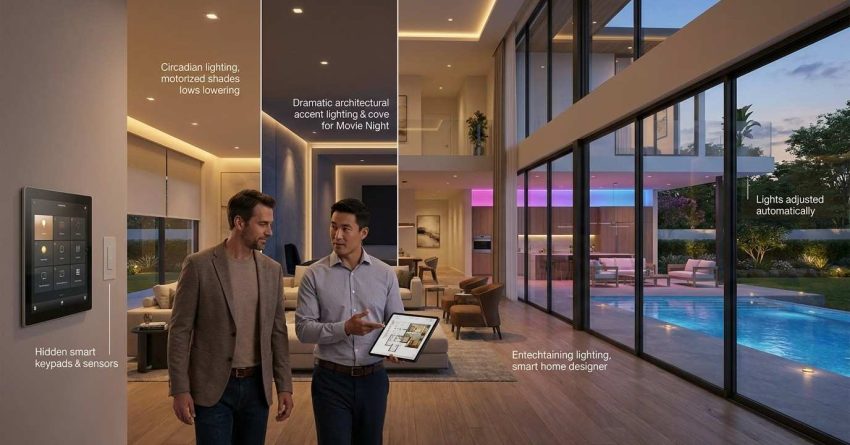
Lutron HomeWorks is Lutron’s flagship whole-home automation platform, built for luxury residential properties, large estates, and commercial applications where no compromise on performance, customization, or scalability is acceptable. HomeWorks is not sold through retail channels — it is available exclusively through Lutron-authorized dealers and requires professional design, installation, and commissioning.
The system supports thousands of devices across an entire property, including lighting, motorized window treatments, HVAC, security, audio, and video. HomeWorks uses a processor-based architecture, meaning all programming and logic runs through a dedicated central processor rather than a cloud connection, which delivers faster response times and greater reliability.
Key Features of HomeWorks
- Supports thousands of devices across unlimited zones
- Dedicated central processor for local, cloud-independent control
- Full integration with virtually every major smart home platform
- Custom keypads, touchscreens, and architectural controls
- Motorized shades, HVAC, security, AV, and lighting in one system
- Designed and commissioned by Lutron-certified professionals
Who Should Choose HomeWorks?
HomeWorks is the right choice for luxury homeowners, estate managers, and commercial property operators who need a fully integrated, future-proof automation system with no device or zone limitations. The investment is significant — both in hardware and professional installation — but the result is a system that can manage every controllable element of a large property from a single, unified platform.
Lutron Caseta vs RadioRA3 vs HomeWorks: Side-by-Side Comparison
Understanding how these three systems compare across the factors that matter most — installation complexity, scalability, integration depth, and cost — makes the decision straightforward.
Choosing between these three Lutron platforms is easier when you understand how each fits into a broader smart home setup — our overview of smart lighting systems explains how wireless controls, dimmers, and automation hubs work together across a property.
Installation Complexity
Caseta is the simplest to install. Most switches require no neutral wire, and the Smart Bridge setup takes under an hour. A homeowner with basic electrical knowledge can handle device installation, though a licensed electrician is always the safest choice for in-wall wiring.
RadioRA3 requires a Lutron-certified dealer for installation and programming. The system involves more complex wiring, repeater placement, and software configuration that goes well beyond a DIY project.
HomeWorks requires a full design consultation, professional installation, and factory-trained commissioning. Projects typically span multiple days and involve coordination between electricians, AV integrators, and the Lutron dealer.
System Scalability
| Feature | Caseta | RadioRA3 | HomeWorks |
| Max devices | 75 per bridge | 200 per system | Unlimited |
| Multi-zone control | Limited | Yes | Yes — full property |
| Shade integration | Basic | Yes | Yes — full integration |
| HVAC integration | Limited | Yes | Yes |
| AV integration | No | Partial | Yes — full integration |
| Expandability | Low | Medium | High |
Smart Home Integration
Caseta connects to the most popular consumer platforms — Alexa, Google Home, Apple HomeKit, and SmartThings — making it the easiest to fold into an existing smart home setup. RadioRA3 and HomeWorks go deeper, integrating with professional automation platforms like Control4, Crestron, and Savant, which are common in high-end residential and commercial installations.
Cost and Budget Considerations
Caseta is the most affordable entry point. Individual dimmers and switches typically range from $50 to $80 per device, with the Smart Bridge adding approximately $80 to $100. A whole-room setup for three to four switches costs $200 to $400 in hardware alone, plus installation labor.
RadioRA3 hardware costs more per device, and professional programming adds to the total project cost. A mid-size home installation typically runs several thousand dollars depending on the number of zones and device types.
HomeWorks is a premium investment. Full-property installations in luxury homes commonly range from $10,000 to $50,000 or more, depending on property size, device count, and integration complexity. The cost reflects the system’s capability, reliability, and the level of professional design and commissioning involved.
Which Lutron System Is Right for Your Property?
The right Lutron system depends on three factors: property size, budget, and how deeply you want your lighting integrated with other smart home systems.
Choose Caseta if you are upgrading one to several rooms in a standard home, want a system you can expand gradually, and prefer a straightforward installation with broad smart home compatibility.
Choose RadioRA3 if you have a larger home, want whole-home lighting control with scene programming, and are ready to work with a professional dealer for installation and setup.
Choose HomeWorks if you are building or renovating a luxury property, need a fully integrated automation system with no device limits, and want a platform that can manage every controllable element of your home from a single interface.
For smaller properties where a single-room upgrade is all that is needed, our handyman installation help explains how skilled professionals can handle straightforward device swaps and smart switch installations without a full electrical project.
Professional Installation: Why It Matters for All Three Systems
Even Caseta — the most DIY-friendly of the three — involves in-wall wiring that carries real safety risks when handled incorrectly. Improper wiring can damage devices, trip breakers, or create fire hazards that are not immediately visible. RadioRA3 and HomeWorks add layers of complexity that make professional installation not just recommended but required.
All three Lutron systems require precise wiring, load calculations, and in some cases low-voltage programming — our team of licensed electrical contractors handles every step of the installation process, ensuring your system is safe, code-compliant, and fully operational from day one.
Working with a qualified professional also protects your warranty. Lutron’s warranty coverage on RadioRA3 and HomeWorks components is contingent on installation by a certified dealer. Attempting self-installation on these systems can void coverage entirely, leaving you responsible for the full cost of any hardware failures.
Beyond safety and warranty protection, professional installation ensures your system is programmed correctly from the start. Scenes, schedules, and integrations that are set up properly during commissioning save hours of troubleshooting later and deliver the seamless experience these systems are designed to provide.
Conclusion
Lutron Caseta, RadioRA3, and HomeWorks each serve a distinct segment of the smart lighting market — from accessible single-room upgrades to fully integrated whole-home automation platforms built for luxury properties.
The right choice comes down to your property’s size, your budget, and how much control and integration you need from day one. Each system is engineered to perform at its tier, and none of them underdelivers when matched to the right application.
At Mr. Local Services, our licensed electrical professionals help homeowners and property managers select, install, and commission the right Lutron system for their property — contact us today to get started with a qualified expert who knows these systems inside and out.
Frequently Asked Questions
What is the main difference between Lutron Caseta and RadioRA3?
Caseta is a consumer-grade system designed for straightforward single-home use, supporting up to 75 devices with DIY-friendly installation. RadioRA3 is a professional system supporting up to 200 devices, requiring dealer installation and offering deeper integration with motorized shades, HVAC, and third-party automation platforms.
Does Lutron HomeWorks work with Alexa and Google Home?
Yes, Lutron HomeWorks integrates with Amazon Alexa and Google Home, as well as professional platforms like Control4, Crestron, and Savant. Integration is configured during professional commissioning and can be customized to match the specific automation setup of the property.
Can I install Lutron Caseta myself without an electrician?
Caseta switches can be installed by a confident DIYer in most cases, as they do not require a neutral wire. However, any in-wall wiring work carries electrical safety risks, and a licensed electrician ensures the installation is safe, code-compliant, and covered under applicable warranties.
How much does a Lutron RadioRA3 system cost to install?
RadioRA3 installation costs vary based on property size, device count, and programming complexity. Most mid-size home installations range from several thousand dollars to $15,000 or more when hardware, professional programming, and labor are included. A Lutron-certified dealer can provide a detailed quote based on your specific requirements.
Is Lutron HomeWorks worth the cost for a large home?
For luxury homes, estates, and large properties requiring full integration of lighting, shades, HVAC, security, and AV systems, HomeWorks delivers a level of reliability, customization, and scalability that no consumer-grade system can match. The investment is significant, but the system is designed to last decades with minimal maintenance and full expandability as technology evolves.