
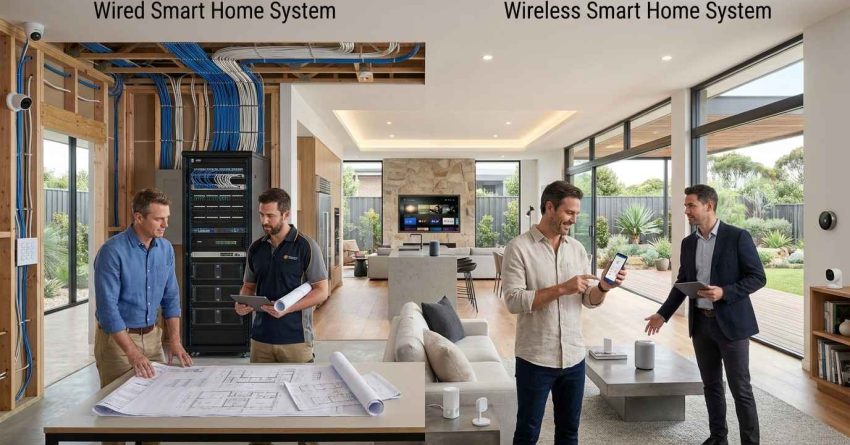
Wired smart home systems offer superior reliability and signal stability, while wireless systems provide faster installation and greater flexibility — and the right choice depends on your property type, budget, and long-term goals. Both approaches can fully automate lighting, security, climate, and entertainment, but they differ significantly in how they are installed, how they communicate, and how easily they can be expanded over time. This guide breaks down every key difference so homeowners, landlords, and property managers can make a confident, informed decision.
Choosing the wrong system type can mean costly retrofits or limited functionality down the road, making this one of the most important decisions in any home automation project.
This article covers how each system works, where each performs best, what installation involves, and how smart home technology connects with the broader systems in your property.
What Is a Wired Smart Home System?
A wired smart home system is a home automation setup in which all devices, sensors, and controls are physically connected through dedicated cables running through the walls, floors, and ceilings of a property. These cables carry both power and data signals, creating a closed, hardwired network that operates independently of Wi-Fi or wireless radio frequencies.
Wired systems have been the standard in high-end residential and commercial construction for decades. They are known for their consistent performance, low susceptibility to interference, and long operational lifespan. Because every connection is physical, there are no dropped signals, no bandwidth competition with other devices, and no dependency on a wireless router.
Wired systems are one of two primary approaches to home automation — our smart home systems guide covers the full range of technologies, protocols, and setup options available to homeowners today.
How Wired Systems Are Installed
Installation requires running low-voltage or structured cabling through wall cavities, conduit, or dedicated raceways before walls are finished. This process is most practical during new construction or major renovation when walls are open and accessible. Retrofitting a wired system into a finished home is possible but significantly more labor-intensive, often requiring drywall removal and patching.
A central control panel or hub typically sits in a utility room or dedicated AV closet, with cables radiating out to each device location throughout the property.
Common Components in a Wired Setup
Wired smart home systems typically include structured cabling (Cat6, coaxial, or fiber), a central automation controller, hardwired lighting control keypads, in-wall touchscreens, wired security sensors and cameras, and dedicated audio/video distribution systems. Each component connects back to the central hub through its own dedicated cable run.
What Is a Wireless Smart Home System?
A wireless smart home system is a home automation setup in which devices communicate through radio frequency protocols such as Wi-Fi, Z-Wave, Zigbee, Thread, or Bluetooth rather than through physical cables. Devices connect to a central hub or directly to a home router, forming a network that can be configured, expanded, and controlled through a smartphone app or voice assistant.
Wireless systems have become the dominant choice for residential smart home installations in the United States, largely because they can be added to any existing home without structural modification. Most consumer-grade smart home products — smart bulbs, plugs, locks, thermostats, and cameras — are wireless by design.
How Wireless Systems Communicate
Each wireless protocol operates on a specific radio frequency and uses a different communication architecture. Wi-Fi devices connect directly to a home router. Z-Wave and Zigbee devices form mesh networks, where each device relays signals to extend coverage. Thread is a newer mesh protocol designed for low-power devices. Bluetooth operates at short range and is typically used for direct device pairing rather than whole-home automation.
The choice of protocol affects range, battery life, network congestion, and compatibility with third-party devices. For a detailed breakdown of how these protocols compare, see our smart home protocols explained.
Common Components in a Wireless Setup
Wireless smart home systems typically include a central hub or smart speaker (Amazon Echo, Google Nest, Apple HomePod, or a dedicated controller like SmartThings), battery-powered or plug-in smart devices, a home Wi-Fi router, and a smartphone app for control. Devices are paired to the hub during setup and can be added or removed at any time without physical modification to the home.
Wired vs Wireless Smart Home Systems: Key Differences
Understanding where these two system types diverge helps homeowners and property managers match the right solution to their specific situation. The differences go beyond installation method and affect daily performance, long-term costs, and how easily the system can grow with the property.
Reliability and Signal Stability
Wired systems deliver consistent, interference-free performance because the signal travels through a physical cable rather than through the air. There is no competition with neighboring Wi-Fi networks, no dead zones, and no latency caused by network congestion. This makes wired systems the preferred choice for mission-critical applications such as security systems, fire detection, and whole-home audio.
Wireless systems are subject to interference from other devices, physical obstructions, and router performance. Mesh protocols like Z-Wave and Zigbee reduce these issues significantly, but they cannot fully replicate the stability of a hardwired connection. For most everyday smart home functions — lighting, thermostats, smart locks — wireless reliability is more than sufficient.
Installation Requirements and Costs
Wired systems require significantly more labor and planning. Cable runs must be mapped, routed, and terminated before walls are closed, which means installation is most cost-effective during new construction or gut renovation. Retrofitting a wired system into a finished home can cost two to three times more than a new-build installation due to the additional labor involved in accessing wall cavities.
Wireless systems can be installed in hours rather than days. Most devices are plug-and-play or require only a screwdriver and a smartphone. Because wired systems require routing cables through walls and connecting to your home’s electrical infrastructure, working with a licensed professional is essential — our electrical installation services explains what a full residential wiring project involves and what to expect during the process.
For a full breakdown of what each approach costs, our smart home installation cost guide covers pricing by system type, property size, and installation complexity.
Flexibility and Scalability
Wireless systems are inherently more flexible. Adding a new device means purchasing it, pairing it to the hub, and placing it wherever it is needed — no cable runs, no wall work, no contractor required. This makes wireless systems ideal for renters, for properties that change use over time, and for homeowners who want to expand their system incrementally.
Wired systems are less flexible once installed. Adding a new device location after walls are closed requires new cable runs. However, wired systems scale exceptionally well within their original design — a properly planned wired infrastructure can support hundreds of devices without performance degradation.
Which Smart Home System Is Right for Your Property?
The best system type depends on three factors: the current state of the property, the intended use, and the budget available for installation. Neither system is universally superior — each has a clear set of scenarios where it outperforms the other.
Best Choice for New Construction
New construction is the ideal environment for a wired smart home system. With walls open and contractors already on site, the incremental cost of running structured cabling is relatively low. A wired infrastructure installed during construction provides decades of reliable, high-performance automation with minimal maintenance. Homeowners building a new property who plan to stay long-term should strongly consider a wired backbone, even if they supplement it with wireless devices for flexibility.
Best Choice for Existing Homes
Wireless systems are the practical choice for most existing homes. The ability to add smart devices without opening walls makes wireless automation accessible to virtually any homeowner regardless of property age or construction type. A wireless system can be fully operational within a single day and expanded over time as budget allows.
For existing homes where some wired infrastructure is desired — such as hardwired security cameras or a wired audio system — a hybrid approach combining wired backbone elements with wireless peripheral devices is increasingly common. Our wired smart home retrofit guide explains how to add hardwired components to a finished home without full renovation. Considerations for Landlords and Property Managers
Landlords and property managers face a different set of priorities than owner-occupants. Wireless systems are generally more appropriate for rental properties because they can be installed and removed without structural modification, they are easier to reset between tenants, and they carry lower upfront costs. Smart locks, video doorbells, and programmable thermostats are the most common wireless upgrades in rental properties.
For larger multi-unit properties or new construction rental developments, a wired system may justify the higher installation cost through reduced maintenance, longer device lifespan, and stronger tenant appeal. Our smart home upgrades for rental properties covers the specific considerations landlords and property managers face when evaluating automation options.
For smaller wireless device installations such as smart locks, thermostats, and sensors, a skilled handyman can handle the setup efficiently — visit our handyman installation help to see the full range of tasks our professionals manage.
Professional Installation vs. DIY Setup
Wireless smart home devices are designed for DIY installation. Most products include step-by-step app-guided setup, and the physical installation rarely requires more than basic tools. Homeowners comfortable with technology can build a fully functional wireless smart home system without professional help.
Wired systems are a different matter. Complex wired installations that involve panel connections, in-wall conduit, or low-voltage wiring should always be handled by licensed electrical professionals who understand local code requirements and can ensure a safe, compliant result. Attempting to run wiring without proper knowledge of electrical codes can create safety hazards and may void homeowner’s insurance coverage.
Even for wireless systems, professional installation is worth considering for whole-home setups where device placement, network configuration, and hub programming require technical expertise. A professional installer can also ensure that all devices are properly integrated and that the system performs reliably from day one. Our DIY smart home setup guide outlines exactly which tasks are safe to handle yourself and which require a licensed professional.
Smart Home Integration With Other Home Systems
One of the most significant advantages of modern smart home technology — whether wired or wireless — is its ability to integrate with the major mechanical and safety systems already in a property. This integration is where smart home automation delivers its greatest long-term value.
Smart thermostats and HVAC controls are among the most impactful home automation upgrades available — our smart HVAC integration explains how modern heating and cooling systems connect with home automation platforms to improve comfort and reduce energy costs. A properly integrated smart thermostat can reduce annual heating and cooling costs by a meaningful margin while improving comfort through automated scheduling and remote control.
Smart home technology also integrates directly with security sensors, door locks, and monitoring equipment — our home safety systems outlines the safety and mobility upgrades that pair naturally with both wired and wireless automation setups. From motion-activated lighting to remote door lock management, these integrations add measurable safety value to any property.
Other common integration points include smart lighting systems, automated window treatments, leak detection sensors, and whole-home audio. Both wired and wireless systems support these integrations, though wired systems typically offer more seamless, low-latency performance for complex multi-system automation.
Conclusion
Wired and wireless smart home systems each serve a distinct set of property types, budgets, and installation scenarios. Wired systems deliver unmatched reliability and long-term performance for new construction and major renovations, while wireless systems offer the speed, flexibility, and accessibility that existing homes and rental properties require.
The decision ultimately comes down to your property’s current state, your timeline, and how deeply you want to integrate automation into the home’s infrastructure. Both approaches can deliver a fully functional, high-performing smart home when matched correctly to the situation.
At Mr. Local Services, our professionals help homeowners, landlords, and property managers choose and install the right smart home solution — contact us today to get started with a system that fits your property and your goals.
Frequently Asked Questions
Can I mix wired and wireless devices in the same smart home system?
Yes, hybrid systems that combine wired and wireless devices are common and practical. Many homeowners use a wired backbone for security and audio while adding wireless devices for lighting, thermostats, and locks.
How long does it take to install a wireless smart home system?
A basic wireless smart home system covering lighting, a thermostat, and smart locks can typically be installed in a single day. Larger whole-home wireless setups may take two to three days depending on the number of devices and the complexity of the hub configuration.
Do wired smart home systems require ongoing maintenance?
Wired systems require very little maintenance once installed. Because there are no batteries to replace and no wireless signals to manage, the primary maintenance need is periodic software updates to the central controller and occasional inspection of physical connections.
Will a smart home system work if my internet goes down?
Wired systems and locally controlled wireless systems (using Z-Wave or Zigbee hubs) continue to function during an internet outage because they operate on a local network. Cloud-dependent wireless devices that require an active internet connection will lose remote access but may retain basic local functionality.
Is a wired smart home system worth the extra cost?
For new construction or full renovation projects where walls are already open, the additional cost of wired infrastructure is relatively modest and delivers decades of reliable performance. For existing homes, the retrofit cost is typically too high to justify unless a major renovation is already planned.
What is the most reliable wireless smart home protocol?
Z-Wave and Zigbee are generally considered the most reliable wireless protocols for whole-home automation because they form mesh networks that extend coverage and reduce single-point failures. Wi-Fi is convenient but can experience congestion in homes with many connected devices.
Can a landlord install a smart home system in a rental property without major construction?
Yes. Wireless smart home devices — including smart locks, video doorbells, thermostats, and lighting controls — can be installed in rental properties without structural modification, making them well-suited for landlords who need flexibility between tenants.