
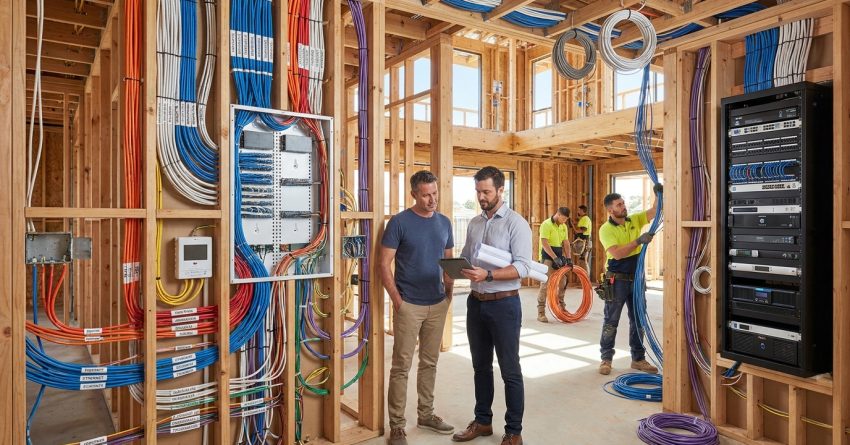
Smart home pre-wiring is the process of installing all necessary wiring, conduit, and low-voltage cabling inside a new home’s walls before drywall is applied — giving every smart system a clean, hidden infrastructure to run on from day one. Done correctly during the construction phase, it eliminates the need for costly retrofits, protects long-term property value, and ensures every room is ready for lighting automation, security, entertainment, networking, and HVAC control.
Skipping pre-wiring during a new build is one of the most expensive decisions a homeowner can make — retrofitting the same systems after drywall installation can cost two to three times more and still deliver inferior results.
This guide covers every system worth pre-wiring, how to plan before construction begins, what each system costs, which professionals to hire, and how to future-proof your new build for technology that does not yet exist.
What Is Smart Home Pre-Wiring and Why It Matters in New Builds
Smart home pre-wiring refers to the installation of electrical wiring, low-voltage cabling, conduit runs, and structured wiring infrastructure inside a home’s wall cavities, ceilings, and floors before the drywall is closed. It is distinct from standard electrical rough-in work because it includes systems beyond power delivery — specifically the data, audio, video, security, and control networks that modern smart homes depend on.
The term “pre-wiring” reflects timing. Walls are open. Trades have access. Every cable run is clean, direct, and hidden. Once drywall goes up, that window closes permanently unless you are willing to cut walls, fish cables, and patch everything back together.
Smart home pre-wiring is a specialized branch of residential electrical work — our electrical services guide explains the full scope of wiring, panel upgrades, and low-voltage installations available for new and existing homes.
How Pre-Wiring Differs from Retrofitting
Retrofitting means adding smart home wiring to a completed home. It requires cutting drywall, fishing cables through insulated cavities, patching, repainting, and often accepting compromises — shorter cable runs, wireless workarounds, or exposed conduit. The labor cost alone is significantly higher because every foot of cable requires far more time to install.
Pre-wiring during construction eliminates all of those constraints. Cables run in straight lines. Conduit is placed exactly where it needs to be. Junction boxes land in the right locations. The result is a cleaner installation, a more reliable system, and a finished home that shows no evidence of the infrastructure running behind its walls.
The Long-Term Value of Wiring During Construction
Homes with documented smart home infrastructure consistently command higher resale values and attract more qualified buyers. A structured wiring system, whole-home audio capability, and pre-wired security infrastructure are features that buyers in the current market actively seek — and that appraisers increasingly recognize as value-adding improvements.
Beyond resale, the practical value is immediate. A homeowner who pre-wires for smart lighting, security, and networking during construction avoids years of workarounds, wireless dead zones, and the frustration of systems that were never designed to work together cleanly.
Planning Your Smart Home Pre-Wiring Before Construction Begins
The single most important rule of smart home pre-wiring is this: decisions made on paper cost nothing. Decisions made after drywall cost thousands. Planning must happen before the framing crew finishes and before any rough-in inspections are scheduled.
Pre-wiring decisions are made during the construction planning phase, which is why coordinating with your remodeling team early is essential — our home remodeling services outlines how we support homeowners from blueprint to build-out.
Mapping Out Your Smart Home Zones
Start by dividing the home into functional zones: living areas, bedrooms, home office, kitchen, garage, outdoor spaces, and any dedicated media or theater rooms. For each zone, identify which smart systems will be active — lighting control, audio, video, security cameras, access control, HVAC sensors, or networking.
This zone map becomes the foundation for your wiring plan. It tells your electrician and low-voltage contractor exactly how many cable runs are needed, where junction boxes must land, and how much capacity your structured wiring panel needs to support.
A useful exercise is to walk through the floor plan room by room and ask three questions for each space: What do I want to control here? What do I want to see or hear here? What do I need to keep secure here? The answers drive every wiring decision that follows.
Working with Your Builder and Electrician
Smart home pre-wiring requires coordination between your general contractor, your licensed electrician, and your low-voltage specialist. These trades work in sequence, and the timing of each rough-in phase must be communicated clearly to avoid conflicts.
Your general contractor controls the construction schedule. Your electrician handles all 120V and 240V wiring, panel work, and any circuits that power smart devices. Your low-voltage specialist handles data cabling, audio/video distribution, security wiring, and structured wiring panel installation. In some cases, one contractor handles both electrical and low-voltage work — but verify their licensing covers both scopes before signing any agreement.
Provide every contractor with a copy of your zone map and a written list of every system you intend to install. Verbal agreements during a busy construction site are unreliable. Written scope documents protect everyone.
Essential Systems to Pre-Wire in Every New Build
Not every smart home system requires the same level of pre-wiring investment. Some systems are nearly impossible to add cleanly after construction. Others can be added later with minimal disruption. The systems below fall into the first category — they should be pre-wired in every new build regardless of whether the homeowner plans to activate them immediately.
Structured Wiring and Low-Voltage Cabling
A structured wiring panel is the central hub where all low-voltage cables terminate — ethernet, coaxial, telephone, and audio/video distribution cables all land here. It is typically installed in a utility room, closet, or garage and provides a single organized point for managing every data connection in the home.
The cabling standard that matters most is Cat6 or Cat6A ethernet, which supports gigabit speeds and is backward compatible with all current and near-future networking equipment. Run at least two Cat6 drops to every room, four to home offices and media rooms, and six or more to the structured wiring panel location itself. Coaxial cable runs to every room where a television may eventually be mounted, even if streaming is the current preference — coaxial supports antenna signals, cable service, and some security camera systems.
Smart Lighting and Automated Switches
Smart lighting systems require either standard electrical wiring with smart switch compatibility or dedicated low-voltage control wiring depending on the system chosen. The most important pre-wiring decision for lighting is ensuring that every switch location has a neutral wire available — many older homes lack neutral wires at switch boxes, which limits smart switch compatibility significantly.
For homes planning a dedicated lighting control system such as Lutron RadioRA or Control4 lighting, additional low-voltage wiring runs are required between switch locations and the central controller. These runs are straightforward during framing and nearly impossible to add cleanly afterward.
Security Systems and Smart Locks
A pre-wired security system is more reliable, more tamper-resistant, and more capable than a wireless-only system. Hardwired door and window sensors, motion detectors, glass break sensors, and siren locations all require low-voltage wiring runs during the framing stage.
Smart locks and access control panels require dedicated low-voltage wiring runs during the framing stage — our smart lock installation resource covers the full range of keyless entry and security hardware we install in new builds.
Every exterior door should receive a wiring run for a smart lock or access control reader. Every entry point — including garage doors, gates, and sliding doors — should have a sensor wire run to the security panel location. Camera locations at entry points, driveways, and perimeter positions require both power and data wiring.
HVAC Controls and Smart Thermostats
Smart thermostats require a C-wire (common wire) connection that many older HVAC systems lack. In a new build, this is a non-issue — the C-wire is included in the thermostat wiring run as a standard practice. For zoned HVAC systems, each zone requires its own thermostat wiring run back to the zone controller.
Pre-wiring for smart thermostats and zoned HVAC systems requires coordination between your electrician and HVAC contractor — our HVAC control wiring guide explains what infrastructure needs to be in place before drywall goes up.
If the home will use a whole-home automation system that integrates HVAC control, additional communication wiring between the HVAC equipment and the automation controller may be required. Confirm this with your automation system vendor before rough-in begins.
Audio, Video, and Entertainment Pre-Wiring
Entertainment infrastructure is one of the most visible and frequently used aspects of a smart home. It is also one of the areas where poor planning creates the most frustration — a television mounted on a wall with visible cables, a speaker that cannot be positioned correctly, or a home theater that requires a wireless workaround because the right cables were never run.
Whole-Home Audio Distribution
A whole-home audio system distributes music and audio content to speakers in multiple rooms simultaneously, with independent volume and source control in each zone. The infrastructure requires in-wall speaker wire runs from a central amplifier location to every speaker position, plus control wiring or network connections for zone controllers.
Speaker wire gauge matters. Use 14-gauge or 16-gauge in-wall rated speaker wire for runs up to 50 feet, and 12-gauge for longer runs. Run wire to every location where a ceiling speaker, in-wall speaker, or outdoor speaker may eventually be installed — even if speakers are not purchased immediately. The cost of the wire is negligible compared to the cost of adding it later.
For homes using a network-based audio system such as Sonos or similar platforms, the speaker wire runs remain the same, but the amplifier and control infrastructure is simpler. Still run the wire during construction.
Home Theater and Multi-Room Video
A dedicated home theater room requires HDMI cable runs, speaker wire for surround sound positions, a conduit run for projector cable management, and power outlets at equipment rack, projector, and screen locations. The projector conduit run is particularly important — it allows future cable upgrades without opening the ceiling.
For multi-room video distribution, coaxial cable runs to every television location provide the backbone for both antenna signals and distribution systems. HDMI over Cat6 extenders are a common solution for distributing video from a central equipment rack to televisions throughout the home — which means those Cat6 drops to every room serve double duty for both networking and video distribution.
Network Infrastructure: The Backbone of Every Smart Home
Every smart home system — lighting, security, HVAC, audio, video, and access control — depends on a reliable network. Wireless networks are convenient but inherently limited by interference, distance, and the number of connected devices competing for bandwidth. A wired ethernet backbone eliminates those limitations entirely.
Ethernet vs. Wi-Fi: Why Wired Still Wins
Wi-Fi is appropriate for mobile devices, laptops, and devices that move around the home. It is not the right choice for devices that stay in one place and require consistent, low-latency connectivity — smart televisions, security cameras, network video recorders, gaming consoles, home automation hubs, and access points all perform better on wired connections.
A wired ethernet network also provides a more secure foundation. Wireless signals can be intercepted. Wired connections cannot be accessed without physical access to the cable. For security cameras, access control systems, and home automation controllers, this distinction matters.
Where to Place Network Drops and Access Points
Every room in the home should receive at minimum two Cat6 drops. Home offices, media rooms, and the main living area should receive four. The structured wiring panel location should receive six or more drops to support patch panel connections, network switches, and internet equipment.
Wireless access points should be ceiling-mounted for optimal coverage and connected via hardwired ethernet — not connected wirelessly to a router. Plan for one access point per 1,500 to 2,000 square feet of living space, and run a Cat6 drop to each access point location during framing. Running ethernet drops and mounting access point brackets during the framing stage is a straightforward task when planned correctly — our network drop installation team can handle low-voltage rough-in work alongside your primary electrical contractor.
Outdoor Smart Home Pre-Wiring Considerations
Outdoor pre-wiring is frequently overlooked during new construction planning, yet it is one of the most difficult areas to address after the fact. Trenching for underground conduit, running cables through exterior walls, and weatherproofing connections are all significantly more disruptive and expensive once landscaping and hardscaping are complete.
Landscape Lighting and Irrigation Controls
Smart landscape lighting systems require low-voltage wiring runs from a transformer location to each fixture position, plus a control connection back to the home automation system or a dedicated landscape lighting controller. The transformer location should be pre-wired with a dedicated 120V outlet during construction.
Outdoor smart lighting and irrigation controllers require conduit runs and low-voltage wiring that must be trenched before hardscaping begins — our landscape lighting wiring guide covers everything from pathway lighting to automated irrigation zones.
Smart irrigation controllers require a wiring run from the controller location — typically in the garage or utility room — to each valve location in the yard. These runs are straightforward when the yard is bare dirt and nearly impossible to add cleanly once sod, pavers, or landscaping is in place.
Outdoor Security Cameras and Gate Access
Exterior security cameras require both power and data connections at each camera location. The preferred approach is Power over Ethernet (PoE), which delivers both power and data through a single Cat6 cable — eliminating the need for a separate power outlet at each camera position.
Exterior security cameras and gate access systems depend on weatherproof conduit runs installed during the foundation and framing stages — our outdoor camera wiring resource details the pre-wiring requirements for every camera type and access point.
Plan camera locations at every entry point, driveway approach, garage, and perimeter corner. Run conduit from each camera location back to the structured wiring panel or a dedicated network video recorder location. Conduit — rather than direct-burial cable — allows future camera upgrades without trenching.
Smart Home Pre-Wiring Costs: What to Budget
Smart home pre-wiring costs vary significantly based on the number of systems included, the size of the home, the complexity of the installation, and local labor rates. The most important cost context is the comparison between pre-wiring during construction and retrofitting after completion.
Cost Breakdown by System Type
Structured wiring panel and Cat6 ethernet infrastructure for a 2,500-square-foot home typically ranges from $2,500 to $5,000 installed, depending on the number of drops and panel complexity. Security system pre-wiring — including door/window sensors, motion detectors, and camera conduit — typically adds $1,500 to $3,500. Whole-home audio speaker wire runs add $800 to $2,000 depending on the number of zones. Smart lighting neutral wire upgrades and control wiring add $500 to $1,500.
A comprehensive pre-wiring package covering networking, security, audio, lighting control, and HVAC integration for a 2,500-square-foot home typically falls in the $6,000 to $12,000 range for materials and labor combined. This figure varies by region and contractor.
Understanding what drives smart home pre-wiring costs starts with knowing which systems require licensed electrical work versus low-voltage installation — our electrical pre-wiring costs section breaks down labor, materials, and permit fees by system type.
Why Pre-Wiring Costs Less Than Retrofitting
The cost advantage of pre-wiring during construction comes from access and efficiency. When walls are open, a cable run that takes 15 minutes during framing takes 3 to 4 hours after drywall — requiring wall cuts, fishing through insulation, patching, and repainting. Multiply that difference across dozens of cable runs and the cost gap becomes substantial.
Industry estimates consistently place retrofit costs at two to three times the equivalent pre-wiring cost for the same scope of work. For a $8,000 pre-wiring package, the equivalent retrofit would typically cost $16,000 to $24,000 — and still deliver a less clean result because of the compromises required when working in finished walls.
Choosing the Right Professionals for Smart Home Pre-Wiring
Smart home pre-wiring involves two distinct licensing categories: licensed electricians who handle 120V and 240V circuits, and low-voltage specialists who handle data, audio, video, and security cabling. Understanding which contractor handles which scope prevents gaps in coverage and ensures every system is installed to code.
Electricians vs. Low-Voltage Specialists
A licensed electrician is required for all work involving standard household voltage — outlet circuits, switch wiring, panel connections, and any circuit that powers smart devices. In most states, low-voltage work — Cat6 cabling, speaker wire, security sensor wiring, and coaxial cable — does not require an electrical license, but some states require a separate low-voltage contractor license.
Verify licensing requirements in your state before hiring. Ask every contractor for their license number and verify it through your state’s contractor licensing board. For smart home pre-wiring, the most efficient approach is often a single contractor who holds both an electrical license and a low-voltage certification — reducing coordination complexity and ensuring consistent accountability across all systems.
Selecting the right contractor for smart home pre-wiring means knowing when to hire a licensed electrician versus a low-voltage specialist — our licensed electrician services explains the credentials, scope of work, and what to verify before signing a contract.
Questions to Ask Before Hiring
Before hiring any contractor for smart home pre-wiring, ask these questions directly: What systems have you pre-wired in new construction? Can you provide references from recent new build projects? Do you hold both an electrical license and a low-voltage certification? Will you provide a written scope of work and cable schedule? Who is responsible for coordinating with the general contractor on rough-in timing?
A contractor who cannot answer these questions clearly is not the right choice for a project where mistakes are buried in walls for the life of the home.
Common Smart Home Pre-Wiring Mistakes to Avoid
The most expensive smart home pre-wiring mistakes share a common cause: decisions deferred until it was too late to make them cleanly. Understanding these mistakes before construction begins is the most effective way to avoid them.
Failing to run conduit in critical locations. Conduit — rather than direct-burial or in-wall cable — allows future cable upgrades without opening walls or trenching. At minimum, run conduit in exterior wall penetrations, underground runs, and any location where cable type may need to change as technology evolves.
One of the most costly pre-wiring mistakes is failing to run conduit before drywall installation — our drywall and ceiling work guide explains the sequencing between rough-in trades and finish work so nothing gets buried by mistake.
Under-specifying cable quantities. The cost difference between running two Cat6 drops to a room and running four is minimal during construction. The cost of adding two more drops after drywall is significant. Always run more than you think you need — unused drops cost almost nothing and provide flexibility for future use cases.
Skipping rooms that seem unlikely to need smart systems. Guest bedrooms, utility rooms, and garage spaces are frequently skipped during pre-wiring planning. These spaces consistently become the locations where homeowners later wish they had run cable — for a guest room television, a garage workshop audio system, or a utility room security camera.
Not documenting the installation. Every cable run should be labeled at both ends and documented in a cable schedule that identifies the cable type, origin, destination, and purpose. Without documentation, troubleshooting and future additions become significantly more difficult.
Choosing the wrong cable standard. Cat5e was the standard a decade ago. Cat6 is the current minimum for new construction. Cat6A is the recommended choice for home offices, media rooms, and any location where 10-gigabit speeds may eventually be needed. Installing Cat5e in a new build today is a decision that will limit the home’s networking capability within a few years.
Future-Proofing Your New Build with Smart Home Pre-Wiring
Technology changes faster than construction cycles. A home built today will likely be occupied for 20 to 30 years, during which time smart home technology will evolve in ways that are difficult to predict precisely. Future-proofing is not about predicting the future — it is about building infrastructure flexible enough to accommodate change without requiring major renovation.
The most effective future-proofing strategy is conduit. Conduit installed in walls, ceilings, and underground runs allows any cable type to be pulled through and replaced as technology evolves. A conduit run installed today for a Cat6 cable can carry a Cat8 cable, a fiber optic cable, or a cable type that does not yet exist — without opening a single wall.
The second most effective strategy is over-specifying capacity at the structured wiring panel. A panel with room for 24 or 48 ports costs only marginally more than a smaller panel during construction, but provides the capacity to add systems, expand zones, and integrate new technology without replacing the panel itself.
The third strategy is standardization. Choose cable types, connector standards, and infrastructure components that align with industry standards rather than proprietary systems. Proprietary systems lock homeowners into a single vendor’s ecosystem and become obsolete when that vendor changes direction or exits the market.
Future-proofing a new build goes beyond wiring — it includes structural, mechanical, and finish decisions that affect long-term property value — our future-proof home upgrades resource covers the full range of improvements that protect your investment over time.
Conclusion
Smart home pre-wiring is the single highest-return investment available during new construction — delivering cleaner installations, lower long-term costs, and a home infrastructure that supports every smart system from day one. The systems covered in this guide — networking, security, lighting, HVAC, audio, video, and outdoor controls — all perform better, cost less, and integrate more cleanly when wired during the framing stage.
The window for pre-wiring closes permanently when drywall goes up. Every decision deferred past that point becomes a retrofit problem with a retrofit price tag attached to it.
At Mr. Local Services, our team coordinates every aspect of smart home pre-wiring — from initial planning and zone mapping through licensed electrical rough-in and low-voltage installation — so your new build is ready for every smart system you want today and every upgrade you will want tomorrow. Contact us to schedule a pre-construction consultation before your framing crew finishes.
Frequently Asked Questions
What is the best time to pre-wire a new home for smart systems?
The best time is during the framing stage, after rough framing is complete but before insulation and drywall are installed. This window gives electricians and low-voltage contractors full access to wall cavities, ceiling joists, and floor systems without any obstruction.
How much does smart home pre-wiring cost for a new build?
A comprehensive pre-wiring package for a 2,500-square-foot home typically costs between $6,000 and $12,000 for materials and labor combined, covering networking, security, audio, lighting control, and HVAC integration. Costs vary by region, contractor, and the number of systems included.
Do I need a licensed electrician for smart home pre-wiring?
Yes, for any work involving standard household voltage — outlet circuits, switch wiring, and panel connections — a licensed electrician is required. Low-voltage cabling such as Cat6, speaker wire, and security sensor wiring may be handled by a low-voltage specialist, depending on your state’s licensing requirements.
What cable type should I use for smart home networking in a new build?
Cat6 is the current minimum standard for new construction networking. Cat6A is recommended for home offices, media rooms, and any location where 10-gigabit speeds may eventually be needed. Avoid Cat5e in new builds — it will limit networking capability within a few years.
Can I add smart home wiring after my home is already built?
Yes, but retrofitting is significantly more expensive and delivers less clean results than pre-wiring during construction. Retrofit costs are typically two to three times higher than equivalent pre-wiring costs because of the labor required to fish cables through finished walls, patch drywall, and repaint.
What is a structured wiring panel and do I need one?
A structured wiring panel is a central hub where all low-voltage cables in the home terminate — ethernet, coaxial, audio, and security wiring all land here. It provides a single organized point for managing every data connection in the home. Every new build with smart home infrastructure should include one.
How many ethernet drops should I run in each room?
Run at minimum two Cat6 drops to every room, four to home offices and media rooms, and six or more to the structured wiring panel location. Running more drops than you currently need costs very little during construction and provides flexibility for future use cases that are difficult to predict at build time.
What outdoor systems should be pre-wired during new construction?
Pre-wire for security cameras at all entry points and perimeter corners using PoE-capable conduit runs, landscape lighting transformer circuits and low-voltage wiring, smart irrigation valve wiring, gate access control, and outdoor audio speaker wire. All underground runs should use conduit rather than direct-burial cable to allow future upgrades.